Deploy to develop. Promote through staging to production.
Every app gets real environments and one-click pushes into them. There are two chains here, and we keep them apart: custom frontends move develop → staging → production, role-gated, with non-destructive rollback. Platform apps publish from a working copy to testing and production in one step.
No pipelines to write. No servers to provision. No DevOps hire required.
Windows and macOS desktop builds are ready, handed over with your invite — the download page has the access list and the installer link.
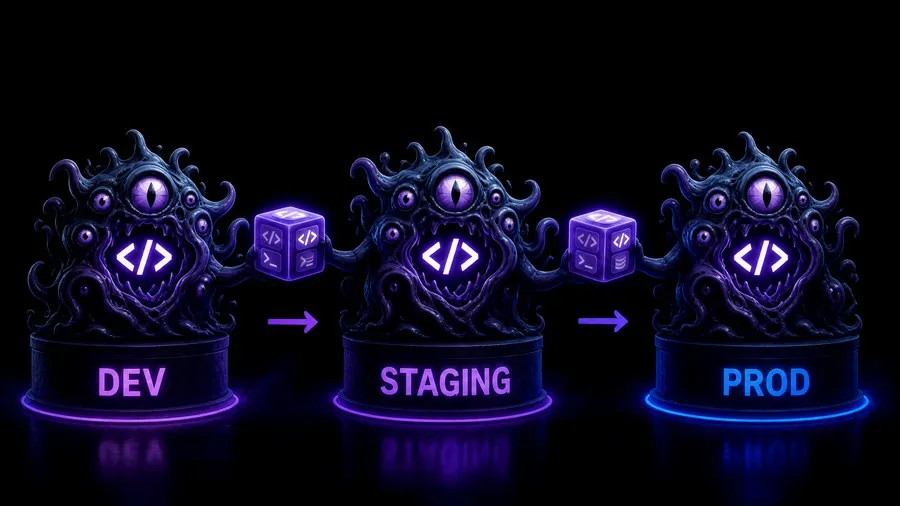
Three environments, one direction.
Each environment has its own URL, its own environment variables and its own deployment history. Code enters at develop and moves forward only.
↩ rollback · owner / editor / viewer · versioned · audited
Where builds land.
The only environment you deploy to directly. Iterate here with your agent; every deploy versions the working copy first, so every push leaves an immutable snapshot you can promote or roll back to.
Where the reviewers look.
Reached only by promoting from develop. Show it, get the yes, and leave it running as the reference build until production catches up.
Where end users are.
Reached only by promoting from staging, and only by an owner. Rollback here is also owner-only. Nothing skips a tier to get here.
Strict, unidirectional, role-gated.
The chain is enforced in code, not in a runbook. Develop is reachable only through deploy; staging and production only through promote. An attempt to skip a tier is refused with a 409. An attempt to promote backwards is refused with a 400.
Roles are per app. Owners can do everything, and only owners can promote to production or roll production back. Editors deploy to develop and promote to staging. Viewers read — the file tree, the versions, the deployment log — and change nothing.
That split maps onto how teams actually ship: the person who built it gets it in front of the reviewers; the person accountable for production presses the last button.
| Action | Owner | Editor | Viewer |
|---|---|---|---|
| Deploy to develop | yes | yes | no |
| Promote develop → staging | yes | yes | no |
| Promote staging → production | yes | no | no |
| Roll back production | yes | no | no |
| Read files, versions, deployments | yes | yes | yes |
↩ rollback · rollback = a new deployment, not a deletion
Non-destructive by construction.
Rollback is not an undo button that rewrites history. It is another entry in the same append-only log — version 13, sent to production, by this owner, at this time, status succeeded — so the audit trail gets longer, never shorter.
It targets the previous successful version. If you need something older, deploy that version and promote it through the chain like any other change; the log stays honest either way. Restoring an old version into the working copy is a different move — it overwrites uncommitted edits, so version the working copy first.
Because versions are immutable snapshots that stay in storage, the switch is a pointer move at the edge, not a re-upload. We publish no retention schedule for old versions yet — the security page states what is confirmed and what is not.
Per-environment variable bundles, applied at build.
Each app carries a bundle of environment variables per environment — develop, staging and production each get their own VITE_* values, applied at build. Promotion does not copy bytes from one bucket to another: it rebuilds the same version for the target environment with that environment's bundle.
Two things to know before you fill them in. VITE_-prefixed values are compiled into the browser bundle, so they are configuration, not secrets. And we make no encryption-at-rest claim for these bundles today — data and tenancy states the position rather than hiding it.
A frozen snapshot of the build environment is kept with every deployment, so “why did version 15 break in staging?” is a lookup, not an archaeology project.
An append-only deployment log, with live status.
Every deployment is a row you can read: which version went to which environment, who triggered it, when, its status, any error, and the URL it served. Deploys, promotions and rollbacks all land in the same log — one query shows exactly what happened.
While a build runs, status streams live to the desktop app phase by phase — fetch, install, build, verify, upload, promote, invalidate — as it happens.
Platform apps publish differently.
Apps assembled from platform primitives do not go through the develop → staging → production chain above. They have their own, simpler lifecycle — described here on its own so the two are never confused.
Current is the working copy. Every committed edit bumps its version. Testing and Production are published snapshots that the renderer serves to end users.
publish-solution copies Current to Testing and Production in one step. There is no separate staging-to-production approval gate at this level; who sees what in the published app is governed by groups and permissions. unpublish-solution exists too.
Bench holds frozen backup snapshots. Branch from one when you want to try something; it is never published from.
- Custom domains are coming soon. Every environment gets an HTTPS URL on our domain today; the item is tracked on the roadmap.
- No retention schedule is published for old versions or build artifacts yet.
- The custom-frontend pipeline ships static builds only; the size cap and the rest of its limits are on custom frontends.
Everything else on this page is live today. Environments are included in the organization license and never metered; you still bring the AI subscription you already pay for. A metered tool would have charged you for every one of those promotions — the arithmetic is here.
Reviewing this for someone else? The IT and security brief covers auth, roles and audit in one page. Security · Pricing
Skipping tiers, variables, rollback, failures.
Can I skip staging and push straight to production?
No. The chain is enforced in code: an attempt to skip a tier is refused with a 409, an attempt to promote backwards with a 400. Deploy to develop, promote to staging, then promote to production as an owner.
What happens to my environment variables when I promote?
Nothing moves between environments. Promotion rebuilds the same version against the target environment's own bundle, and a frozen snapshot of that build environment is kept with the deployment. VITE_-prefixed values are compiled into the browser bundle, so treat them as configuration rather than secrets.
Can I roll back further than one version?
Rollback targets the previous successful version for that environment. For anything older, deploy that version and promote it through the chain like any other change. Restoring an old version into the working copy is a different move — it overwrites uncommitted edits.
What happens if a promotion fails halfway?
The environment head only moves when the deploy completes, so a failed promotion leaves the current version serving. The failure lands in the deployment log as its own row, with the phase it stopped in and the error.
Bring us something you want built.
CodeMonster is invite only while we work directly with early adopters. Request an invite and we will meet, scope what you want to build, and get you productive. You bring the AI subscription you already pay for.